 MSPDF
MSPDF
Read, organize and lock down PDFs
MSPDF is a fast, native PDF workbench. Read crisp pages, rearrange them like cards on a table, merge and split files, and fill forms, all on your own machine.
983
Real-world test PDFs, 0 crashes
AES-256
Encryption supported
3
Windows builds: x64, x86, ARM64
Pages that look right
World scripts, vertical Japanese, colour emoji, gradients and transparency render as the author intended, sharp at any zoom.
Organize at a glance
See every page as a thumbnail. Select, rotate, delete, insert and reorder, then undo any step.
Private by design
No telemetry and no cloud. Documents never leave your machine, and every save keeps the original bytes intact.
MSPDF
Read and mark up
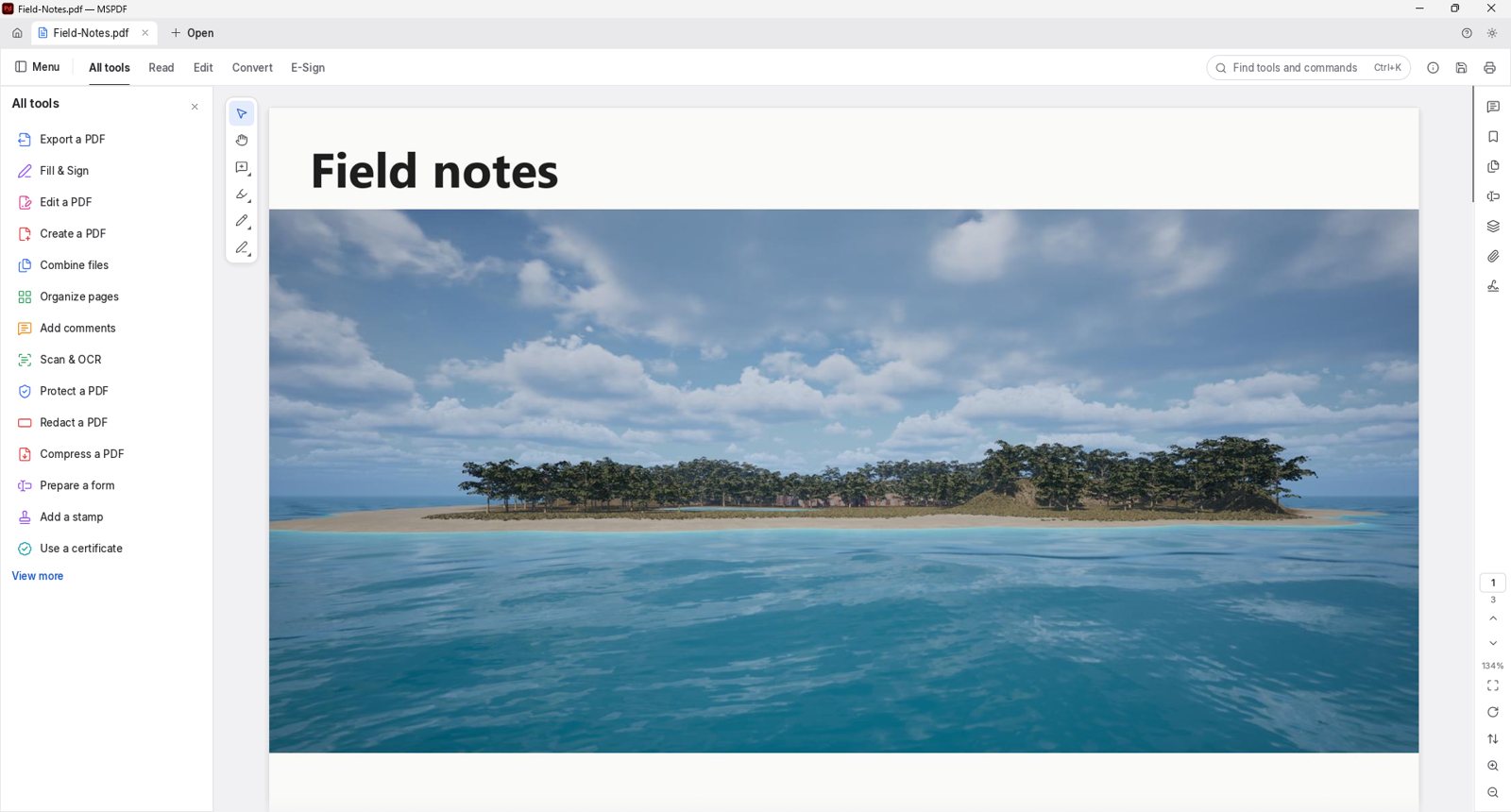
A multi-page PDF open in a tab, with the full tools list on the left and markup tools beside the page.
Everything in MSPDF
Reading
- Tile rendering keeps text crisp at any zoom
- Kerning, ligatures, right-to-left and vertical CJK text
- Colour emoji, shadings, blend modes and soft masks
- Continuous, single page, two-up and full screen layouts
- Distraction-free Read mode
- Light and dark themes
- Damaged files are repaired and still open
Find & navigate
- Search as you type, with a match counter
- Text selection follows true reading order, columns included
- Nested bookmarks with a title search
- Page thumbnails and the document's own page labels
- Command palette searches every tool with one shortcut
- All tools catalogue for browsing
Organize
- Page grid shows every page at once
- Rotate, delete, insert blank pages and move pages
- Insert pages from another file
- Combine any number of PDFs, one bookmark per file
- Extract selected pages into a new document
- Split every n pages or before chosen pages
- Links, form fields and layers survive merging
Forms & markup
- Fields panel lists every field and its value
- Text fields, checkboxes, radio buttons, lists and signature fields
- Fill in forms with highlighted fields
- Threaded comments with replies and status
- Highlights, shapes, ink, text boxes and stamps
- Toggle layers and the page redraws instantly
- Open or save file attachments
Protect
- Opens files protected from 40-bit RC4 up to AES-256
- User and owner passwords, including Unicode passwords
- Honours author-set permissions
- Edits to encrypted files are saved encrypted
- Redact and sanitize documents
- Edit title, author, subject and keywords
- See embedded fonts and the full security picture
Safe saving
- Undo history you can walk back and forward
- Incremental saves leave original bytes untouched
- Atomic writes swap in a finished temporary copy
- Autosave every minute with crash recovery
- Unsaved tabs are marked and closing asks first
- Command-line tools for merge, extract and split
Open a PDF and take your pages back.
Monthly
$5 / month
All 23 apps
30-day free trial
Yearly Save 20%
$48 / year
All 23 apps
30-day free trial